
Objective
Whenever necessary, the system allows the deletion of documents, ensuring that discontinued or incorrectly registered records do not remain available for use.
Prerequisites
- To delete documents, the Delete documents permission must be enabled in the user's permission group, For more information about configuring permissions, click here.

Step-by-step
1. Access the Search tab and select Internal Documents. Use the filters to refine tour search, if necessary. To better understand how to search for a documento, click here.
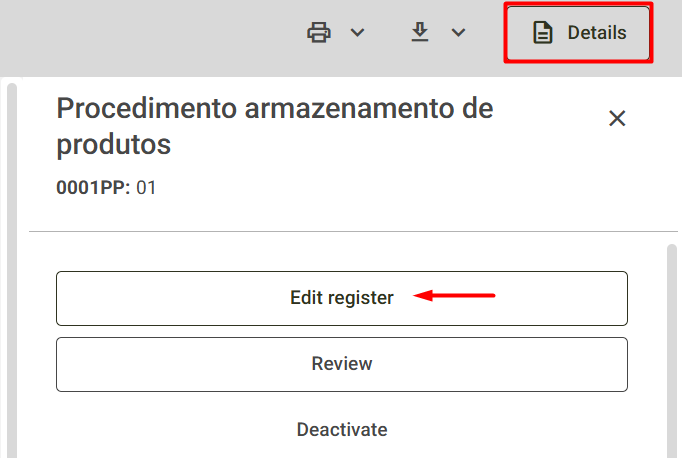
2. Clicking on the selected document will open its display, and on the right, the details screen will appear. For more information about this screen, click here.
3. Next, select the Edit register option displayed on the screen.
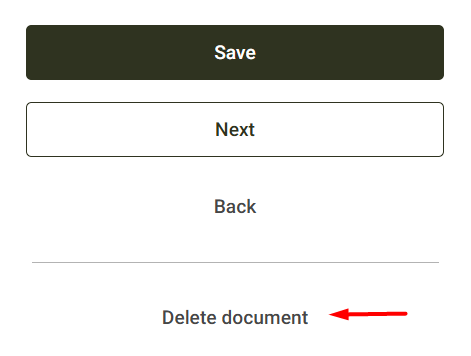
4. On the screen that appears, click the Delete document button, located at the bottom of the screen.
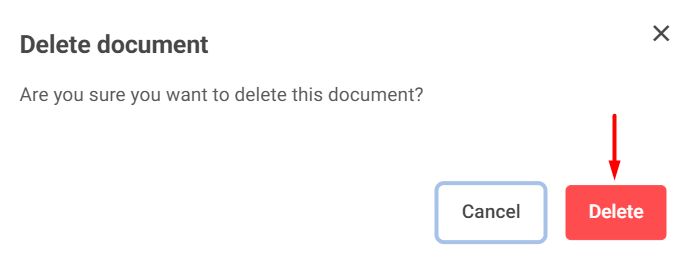
5. Next, in the confirmation window, click Delete to confirm the action.
The system will then display the following message, confirming the deletion of the document.

Note: Once deleted, the document cannot be recovered.